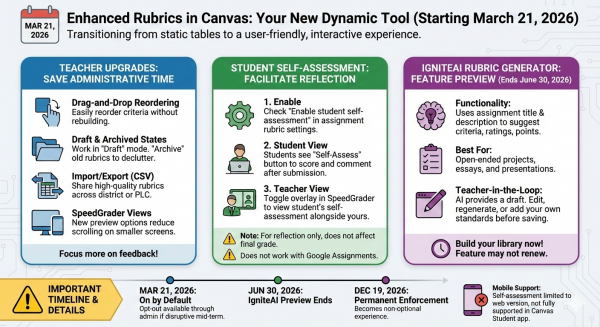
Starting March 21, 2026, P-CCS will transition to the Enhanced Rubrics experience in Canvas. This update is designed to move rubrics from a “static table” to a more dynamic, user-friendly tool for both you and your students.
Key Upgrades for Teachers
The new interface focuses on saving you administrative time so you can focus on feedback:
- Drag-and-Drop Reordering: You can finally click and drag to reorder criteria. No more deleting and rebuilding a rubric just to move one row.
- Draft & Archived States: Work on a rubric in “Draft” mode until it’s ready. You can also “Archive” old rubrics to declutter your list without losing past grading data.
- Import/Export (CSV): You can now import existing rubrics and export you Canvas rubrics. (see video below)
- SpeedGrader Views: New horizontal and vertical preview options reduce the amount of scrolling needed when grading on smaller laptop screens.
Student Self-Assessment
With both Enhanced Rubrics and Assignment Enhancements active, you can now offer student self-reflection directly in Canvas:
- How to Enable: In the rubric settings for a specific assignment, check the “Enable student self-assessment” box.
- Student View: Once they submit their work, students will see a “Self-Assess” button. They can score themselves and leave comments on each criterion.
- Teacher View: In SpeedGrader, you can toggle an overlay to see the student’s self-assessment right alongside your own.
Note: Student self-assessments are for reflection and do not automatically affect the final grade. They also do not currently work for Google Assignments.
IgniteAI Rubric Generator
This tool is available as a “feature preview” through June 30, 2026. Since it may not be renewed for the next school year, now is the time to use it to build up your personal rubric library.
- Functionality: It uses your assignment’s title and description to suggest criteria, ratings, and point values.
- Best For: Open-ended projects, essays, and presentations.
- Teacher-in-the-Loop: The AI only provides a draft. You can (and should) edit, regenerate specific criteria, or add your own standards/outcomes before saving.
How do I use IgniteAI Generator for Rubrics in an assignment? – Instructure Community
⚠️ A Few Important Details
- Mobile Support: Self-assessment is currently limited to the web version of Canvas; it is not yet fully supported in the Canvas Student app.
- March 21 Status: The enhanced rubrics feature will be “On by Default” starting this date. You won’t need to do anything to see the new interface. If it is too disruptive, submit a ticket and we can walk you through how to turn it off (until December).
- Final Enforcement: This will become the permanent, non-optional experience on December 19, 2026.