Mastering the Canvas Semester Transition: A Teacher’s Workflow Guide
The transition between semesters is more than an administrative checkpoint; it is a critical period for ensuring academic continuity, finalizing student records, and preserving the integrity of your course data. A smooth transition sets the stage for a successful start to the new term. This guide provides a sequential, phased workflow to help you manage the process efficiently and avoid common pitfalls.
The entire process is governed by a series of firm deadlines. Please review the following key dates carefully to plan your work accordingly.
Phase 1: Finalizing the Current Semester (S1/Q2)
Properly closing out the semester is a strategic process that involves managing two different “read-only” deadlines: one for students and one for teachers. This phase focuses on finalizing your gradebook and managing course access permissions before the system automatically transitions your courses into a permanent, read-only state. Understanding the interplay between these deadlines is key to avoiding issues with late or crossover work.
Teacher Access & Grading Responsibilities
Your primary responsibility during this phase is to complete all grading and course edits before the system locks your access.
- Final Grading Deadline: All grading and edits for Semester 1/Quarter 2 courses must be completed by January 21, 2026, at 11:59pm.
- Read-Only Implication: After this deadline, your S1/Q2 courses will become read-only. You will no longer be able to edit assignments or enter grades.
- Challenge for Year-Long Courses: This deadline presents a unique challenge for year-long courses. If you anticipate needing to grade an S1 assignment after the January 22 deadline, you must update its due date to fall within the new semester before the S1 term officially ends.
Student Access & Submission Rules
Student access to course materials also changes during the transition, which can affect their ability to review content or submit late work.
- Read-Only Access: Students will retain read-only access to their S1/Q2 courses after January 16, 2026, at 11:59pm.
- It is critical to note that students will lose all access to view quiz questions or submit assignments after this term end date.
- Nuance for Year-Long Courses: In a year-long course, students can still submit S1/Q2 assignments after the deadline if the availability dates permit. However, due to the grading window limits, you will be unable to grade these submissions in Canvas after January 21.
Completing these standard closing procedures is the first step, but the semester transition often involves handling special circumstances and exceptions.
Phase 2: Managing Special Circumstances and Crossover Assignments
The end of a semester often involves managing non-standard situations, such as accommodating late work or adjusting assignments that span across two terms. This section provides guidance on how to handle these exceptions.
Moving Assignments into the New Semester (S2/Q3)
If you have an assignment from S1/Q2 that you need to move into the new S2/Q3 grading period, you must act proactively before the system locks the assignment’s settings.
- Identify any S1/Q2 assignments in a year-long course that need to be graded after the S1 term ends.
- In Canvas, edit the assignment and adjust the due date (directions to bulk update due dates) to a date that falls within the S2/Q3 term.
- This action must be completed by the critical deadline of January 16.
Missing this deadline has a direct consequence: after January 16, you will be unable to change the due date yourself and will need to submit a tech support ticket to have the assignment updated.
Handling Late Submissions and Grade Changes
Be aware of a key technical limitation regarding grade synchronization between Canvas and MiStar after the term concludes.
- Grade Passback Limitation: S1/Q2 grades will NOT pass back from Canvas to MiStar after the MiStar term ends and the grading window closes on January 21.
- Required Action: If a student submits late work that results in a change to their final report card grade, you must work directly with your building’s records office to have the student’s report card manually updated.
Successfully managing these legacy issues from the old semester allows you to transition your focus to proactively setting up your new courses for success.
Phase 3: Preparing and Launching the New Semester (S2/Q3)
This phase shifts from closing out the past semester to actively preparing for the upcoming one. The following steps are essential for building a clean, well-organized, and accessible course environment for your new students.
Structuring Your New Course Content
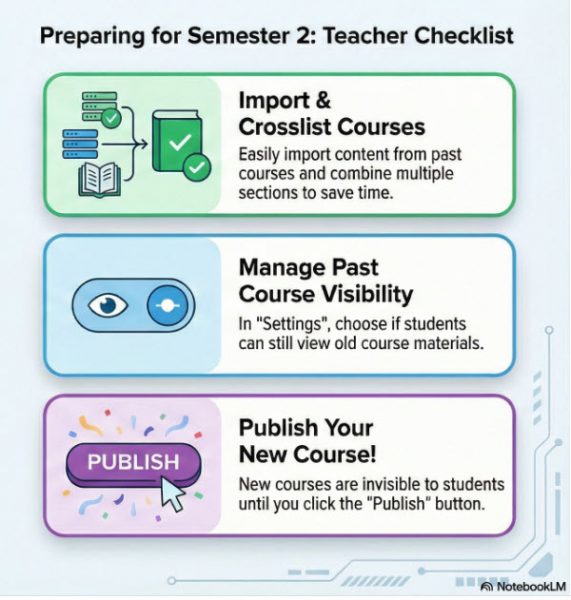
Importing Content You can easily import content from courses taught in previous years to save time on setup.
Cross-Listing Sections If you teach multiple sections of the same course, cross-listing them in Canvas allows you to manage content and communication from a single master course, which can be a significant time-saver.
However, if you have a year-long course that you regret not cross-listing, the semester break may seem like a good time to do it. Be aware that this specific action carries a severe risk of students submissions and grades lost. Crosslisting Guide.
Controlling Student Access to Course Materials
Past Courses You have control over whether students can see your past courses. This visibility can be adjusted in your Course Settings. If you allow a course to remain viewable, it will appear for students on their Courses page under the “Past Enrollments” section.
Read-Only Content Prep If you choose to keep past courses visible, it is wise to “prep” the course for read-only student access. This includes unpublishing materials you no longer want them to access, such as answer keys or solutions. It is important to remember that Quizzes are automatically not viewable by students after the term has ended, so no action is required for those items.
New Courses Even if published early, new S2/Q3 courses will not become visible to students until January 20. On that date, only courses you have explicitly published will be accessible.
The Final Step: Publishing Your Course
Your new course must be published for students to see it. This is the final and most crucial step to ensure your course is live and accessible on the first day of the new semester.
You have now completed the setup process. The final checklist below serves as a tool to verify that all critical steps have been addressed.
Final Semester Transition Checklist
This checklist distills the guidance from this document into a set of concrete, actionable steps. Use it to confirm your readiness before, during, and after the semester transition.
Phase 1: Closing S1/Q2
- [ ] Finalize all S1/Q2 grading before the 11:59pm deadline on January 21.
- [ ] For year-long courses, update due dates for any S1 assignments that may need to be graded after January 21.
Phase 2: Managing Crossover
- [ ] Move any S1/Q2 assignments to S2/Q3 by adjusting their due dates before January 16.
- [ ] Note any late grade changes that will require coordination with the records office.
Phase 3: Launching S2/Q3
- [ ] Import content from previous courses as needed.
- [ ] Decide on and execute course cross-listing, acknowledging the data loss implications for year-long courses.
- [ ] Adjust past course settings to control student viewability under “Past Enrollments.”
- [ ] Unpublish sensitive materials (e.g., answer keys) in past courses made viewable to students.
- [ ] Publish your new S2/Q3 course.