Skip to content
P-CCSK12 Tech
 
  • Home
  • Digital Classroom Platforms
    • Canvas
      • Canvas Course Templates
    • Clever
      • Clever Apps
    • Google Workspace
    • Newsela
    • Seesaw
  • Classroom Tech
    • Staff Dell Laptops
      • Previous Staff HP Laptop Guidance
    • iPad Apps
    • Printers
      • Find Me Printing
    • Connecting to WiFi
  • Blog
  • FAQ
  • Quick Links
    • Assistive and Instructional Tech ( A&IT)
    • eEmployee Portal (Paystubs)
    • Frontline Education (Abscence Management and Evaluations)
    • Google Dashboard (Waffle)
    • MiSTAR Q
      • MiSTAR Support
    • Nutrislice – Food Service Menus
    • Rubicon-Atlas Curriculum Mapping
    • SchoolDude (Custodial Requests)
    • Service Request
    • System Status
×
  • Home
  • Digital Classroom Platforms
    • Canvas
      • Canvas Course Templates
    • Clever
      • Clever Apps
    • Google Workspace
    • Newsela
    • Seesaw
  • Classroom Tech
    • Staff Dell Laptops
      • Previous Staff HP Laptop Guidance
    • iPad Apps
    • Printers
      • Find Me Printing
    • Connecting to WiFi
  • Blog
  • FAQ
  • Quick Links
    • Assistive and Instructional Tech ( A&IT)
    • eEmployee Portal (Paystubs)
    • Frontline Education (Abscence Management and Evaluations)
    • Google Dashboard (Waffle)
    • MiSTAR Q
      • MiSTAR Support
    • Nutrislice – Food Service Menus
    • Rubicon-Atlas Curriculum Mapping
    • SchoolDude (Custodial Requests)
    • Service Request
    • System Status
 
×

Summer Care for your district laptop

  • Posted on June 17, 2021
  • By Mark Salzer
  • In Blog
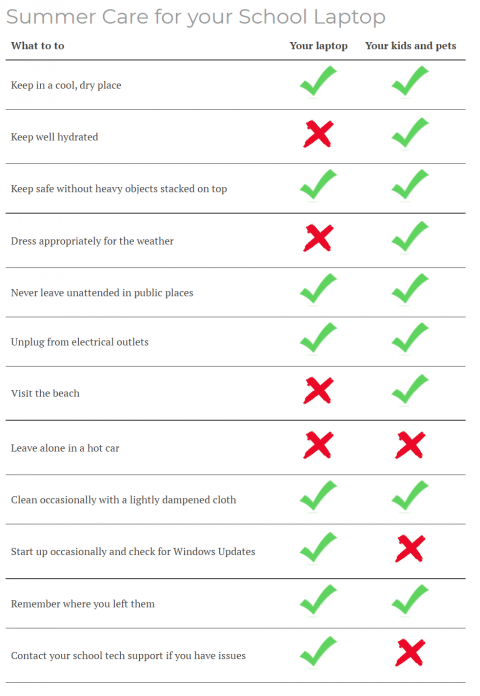
Summer laptop care

If you’re looking for a quick checklist reminder…

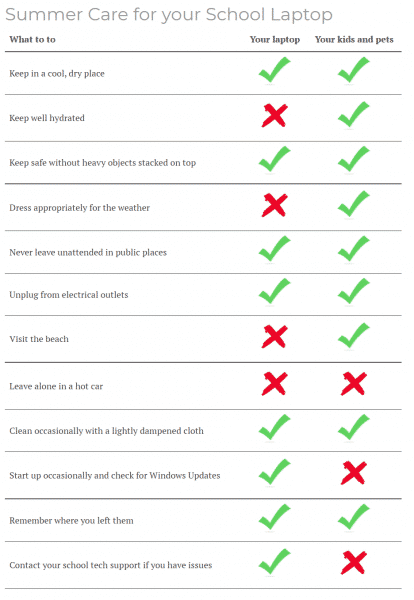
Summer laptop care

FacebookTwitterLinkedIn
Second Notice: End of the Year Tech Checklist
Previous
Network / MISTAR/ SMART outage July 2-4
Next

Recommended Posts

Decorative title graphic
Four Reasons to Use Edtech (still)
An interface titled Results for a user named Ben Anderson, showing a quiz score of 75%. The page is divided into two main sections: Summary Stats: A circular progress bar indicates the 75% score. Next to it, a black circle with the number 2 points to the score 0.75 Out of 1 point. The time for the attempt is listed as 00:45. Your Answers: This section shows a categorization task where the user had to sort elements into "Formal Writing Assignment" or "Informal Message." A black circle with the number 1 and a red arrow points to the specific score for this question: 0.75 / 1 point. Formal Writing Assignment column: Contains four items. Three are marked correct with green checkmarks (Academic tone, Proper grammar and punctuation, Clear thesis statement, Organized paragraph structure). One is marked incorrect with a red "X" (Slang), noting the correct answer was "Informal Message." Informal Message column: Contains three items. Two are marked correct with green checkmarks (Emojis, Text abbreviations). One is marked incorrect with a red "X" (Complete sentences), noting the correct answer was "Formal Writing Assignment."
Introducing Feature Updates: Canvas New Quizzes
P-CCS Tech Status UPDATE: ILLUMINATE DNA Access restored

Useful Status Pages

  • Amazon Web Services
  • BrainPop
  • Canvas
  • Check any website
  • Common Web Services
  • Chrome OS Releases
  • District Website Host
  • Clever
  • DRC
  • E2020 media server status
  • E2020 status
  • Google Cloud Status
  • Google Workspace Product Updates
  • Google Workspace Release Calendar
  • Google Workspace Status
  • Illuminate DnA Status
  • IXL Status Page
  • MISTAR
  • NWEA Status
  • Parchment Status
  • Savvas Status
  • Seesaw Status
  • Wayne RESA Status
  • WIDA Status
© 2026 - P-CCSK12 Tech. All rights reserved.