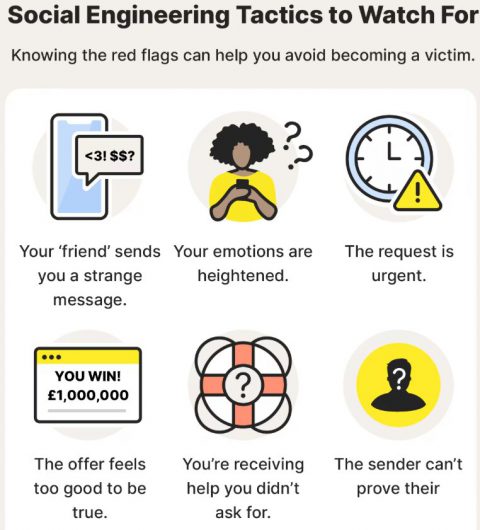
We are currently seeing an increase in sophisticated email phishing and scam campaigns targeting our district as part of a larger uptick nationwide. A few district accounts have recently been compromised and we want to ensure you have the tools to stay protected.
What to look for:
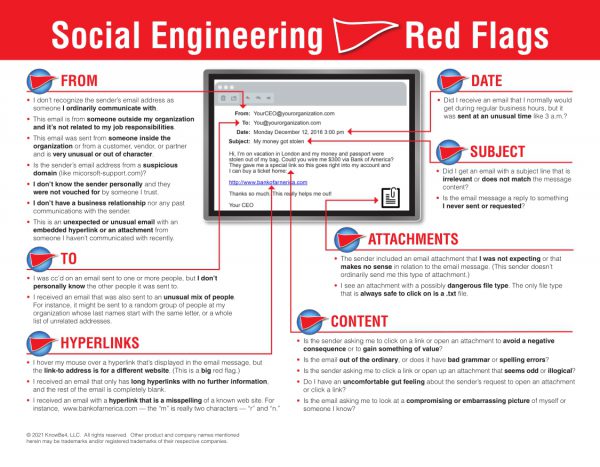
- Fake Logins: Emails redirecting you to a login page to provide your username, password, and two factor code.
- Suspicious Senders: An email that looks like it is from a colleague you would expect, but uses an address not affiliated with the colleague.
- Strange Requests: messages regarding selling items, gift cards, or money transfers.
What to do:
- Think before you click! If you weren’t expecting it, don’t trust it.
- Report it. If you see something suspicious, make use of the phish hook in Gmail (
 ) to report it to our Technology team.
 - Don’t panic. If you think you may have accidentally entered your information into a suspicious link, please submit a service request so we can secure your account.
Here is additional helpful information on how to detect email red flags: