Skip to content
P-CCSK12 Tech
 
  • Home
  • Digital Classroom Platforms
    • Canvas
      • Canvas Course Templates
    • Clever
      • Clever Apps
    • Google Workspace
    • Newsela
    • Seesaw
  • Classroom Tech
    • Staff Dell Laptops
      • Previous Staff HP Laptop Guidance
    • iPad Apps
    • Printers
      • Find Me Printing
    • Connecting to WiFi
  • Blog
  • FAQ
  • Quick Links
    • Assistive and Instructional Tech ( A&IT)
    • eEmployee Portal (Paystubs)
    • Frontline Education (Abscence Management and Evaluations)
    • Google Dashboard (Waffle)
    • MiSTAR Q
      • MiSTAR Support
    • Nutrislice – Food Service Menus
    • Rubicon-Atlas Curriculum Mapping
    • SchoolDude (Custodial Requests)
    • Service Request
    • System Status
×
  • Home
  • Digital Classroom Platforms
    • Canvas
      • Canvas Course Templates
    • Clever
      • Clever Apps
    • Google Workspace
    • Newsela
    • Seesaw
  • Classroom Tech
    • Staff Dell Laptops
      • Previous Staff HP Laptop Guidance
    • iPad Apps
    • Printers
      • Find Me Printing
    • Connecting to WiFi
  • Blog
  • FAQ
  • Quick Links
    • Assistive and Instructional Tech ( A&IT)
    • eEmployee Portal (Paystubs)
    • Frontline Education (Abscence Management and Evaluations)
    • Google Dashboard (Waffle)
    • MiSTAR Q
      • MiSTAR Support
    • Nutrislice – Food Service Menus
    • Rubicon-Atlas Curriculum Mapping
    • SchoolDude (Custodial Requests)
    • Service Request
    • System Status
 
×

Check out the latest AI&T Newsletter- PDF Reader in Read&Write for Google

  • Posted on April 22, 2020
  • By P-CCS TIS
  • In Blog

Our Assistive and Instructional Technology colleagues have a spring newsletter staff are invited to check out. Their main website can be found at https://pccsa-it.weebly.com/ and their Read & Write for Google website can be found at https://sites.google.com/pccsk12.com/rw4g-pccs/ 

Pictures of the newsletter are below. Click on the link to go to the actual newsletter where features are described with hotlinks to videos showcasing those features.
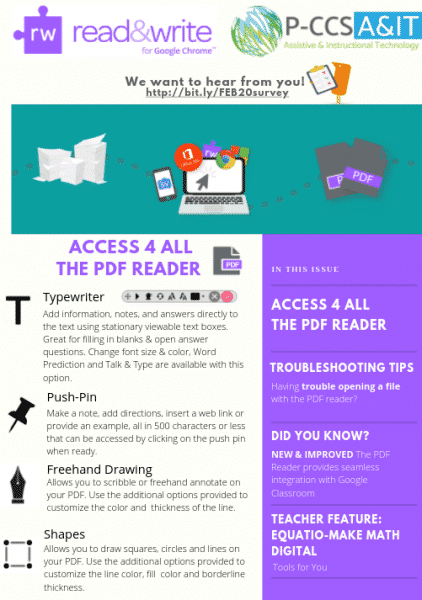
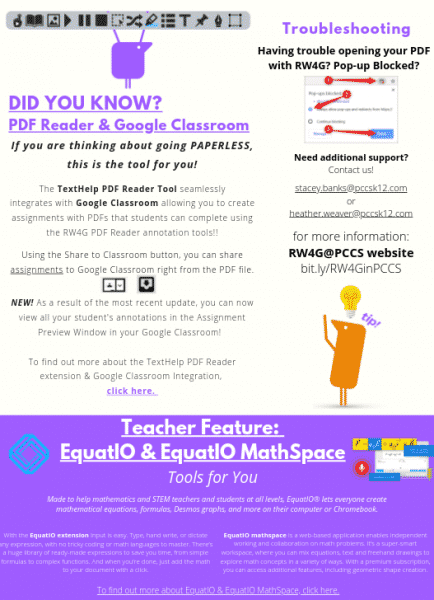
February newsletterFebruary newsletter page 2https://www.canva.com/design/DADy5KzWpkI/Zm55pKeeg1a92SGFPvoQRg/view?utm_content=DADy5KzWpkI&utm_campaign=designshare&utm_medium=link&utm_source=homepage_design_menu

FacebookTwitterLinkedIn
Sora app
No-cost ebooks & audiobooks to support student readers now available for ALL K-12 P-CCS Students
Previous
Email Safety Tips slides
Next

Recommended Posts

Smartmirror broadcast option
Broadcast Your Smartboard so Every Student has the Best Seat
P-CCS Tech Status Increased Phishing Activity Targeting P-CCS Accounts – Please Stay VIGILANT
Increased Phishing Activity Targeting P-CCS Accounts – Stay VIGILANT

Useful Status Pages

  • Amazon Web Services
  • BrainPop
  • Canvas
  • Check any website
  • Common Web Services
  • Chrome OS Releases
  • District Website Host
  • Clever
  • DRC
  • E2020 media server status
  • E2020 status
  • Google Cloud Status
  • Google Workspace Product Updates
  • Google Workspace Release Calendar
  • Google Workspace Status
  • Illuminate DnA Status
  • IXL Status Page
  • M-STEP Status
  • M-STEP Tips & Tricks
  • MISTAR
  • NWEA Status
  • Parchment Status
  • Savvas Status
  • Seesaw Status
  • Wayne RESA Status
  • WIDA Status
  • Zoom
© 2026 - P-CCSK12 Tech. All rights reserved.