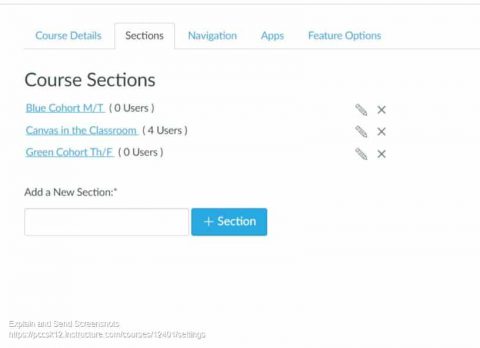
Sections allow you to subdivide students within a course. It allows you to set different due dates for assignments, quizzes, and discussions. This is ideal for managing the Blue and Green Cohorts in the hybrid schedule.
Set up Groups
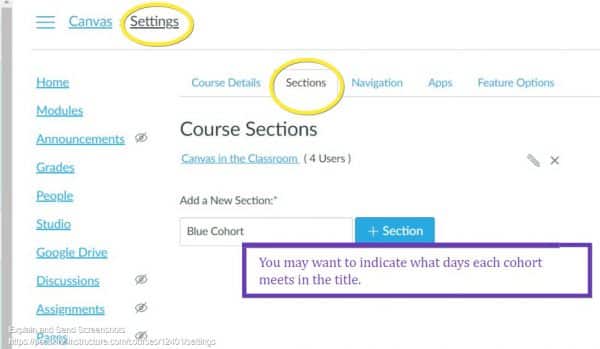
First go to Settings from the Course Navigation menu and you’ll find a tab entitled “Sections.” You can add and name your sections however you wish.
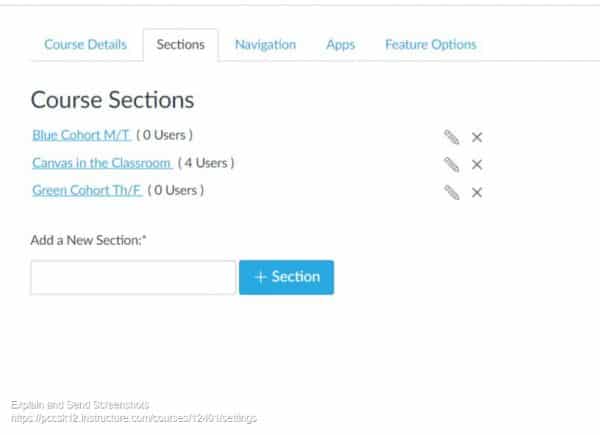
Here’s what you might have for your classes, the sections will be ordered alphabetically:
Add Students to Sections
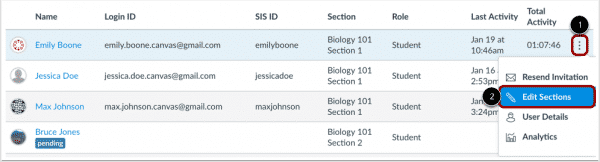
Click on “People” in the Course Navigation menu to add students to the proper section.
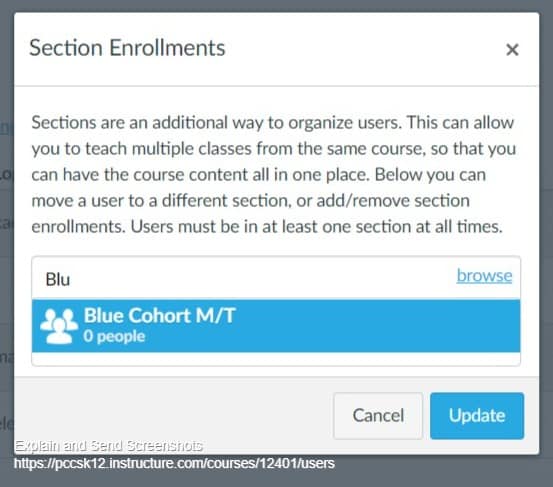
A pop-up will appear and you can start typing the name of the cohort and it will appear for you to select or you can click “browse” and the options will appear.
Do this for each user. When finished you’ll be able to see which cohort/section each user is in.
You can remove the section following the same grading process.
Assignments for Sections
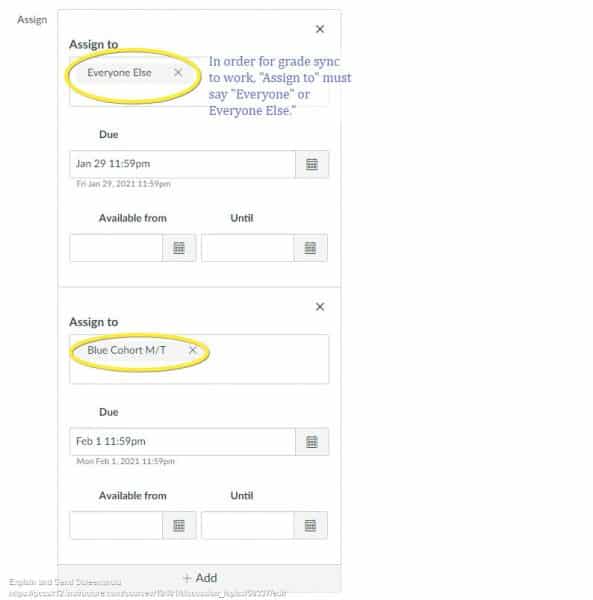
For the purpose of syncing with MiStar, it is very important you ensure one of the “Assign to” groups is listed as “Everyone”
or “Everyone Else.” Do not assign to Blue Cohort and Green Cohort, grading sync will not work.
Our email inboxes can become quite difficult to manage, creating a filter is a great way to clear the clutter without removing important messages that we may need to access later. For example, you may get LMS notifications that you want to filter to a specific place. Follow these steps to help your inbox manage itself using filter rules.
Suppose you get Exit Ticket response emails. You want to move them all to one folder (Gmail calls them labels) to view all at one time.
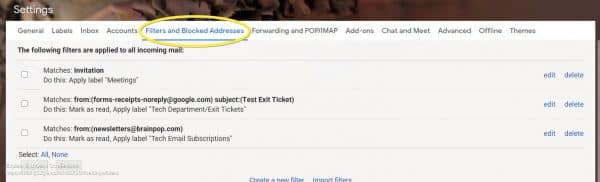
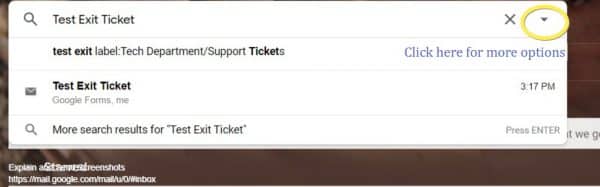
You may receive several notifications from Google Forms that you want to create a filter for.
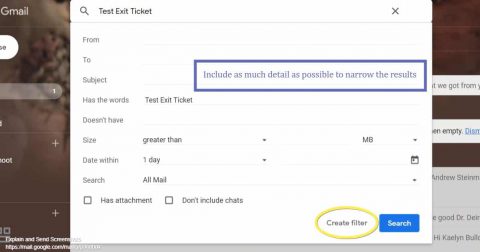
It is best to identify the sender and/or subject of these emails to type into the Search bar. You’ll do an advanced search, so click the drop-down arrow.
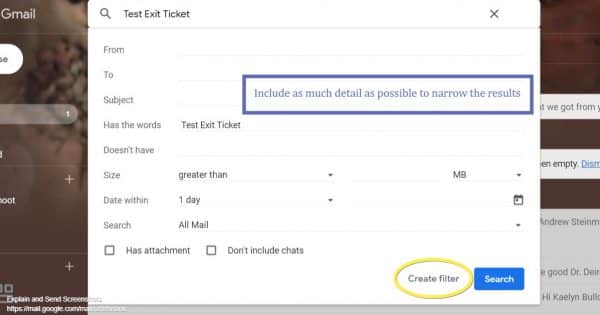
Add as much information as possible to ensure you get the right messages filtered. Then click, “Create Filter.”
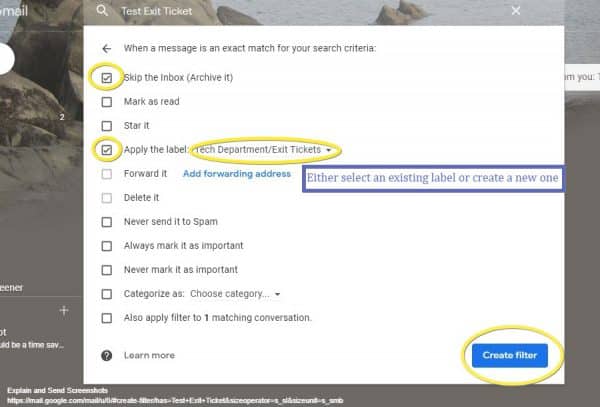
Select any filter rules you see as appropriate for that kind of message. You should apply the appropriate Label (or Create one). You may also want to select “Skip the Inbox.” If the case, rest assured, archived emails in Gmail are not deleted permanently after 30 days. They are permanently stored in your email (and now labelled) until you delete/trash it.
You can always remove or edit your filter in Setting by clicking on the wrench icon in the upper-right corner.
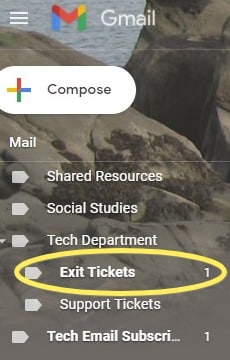
When you are ready to view the filtered emails, access the Label on the left-side menu.
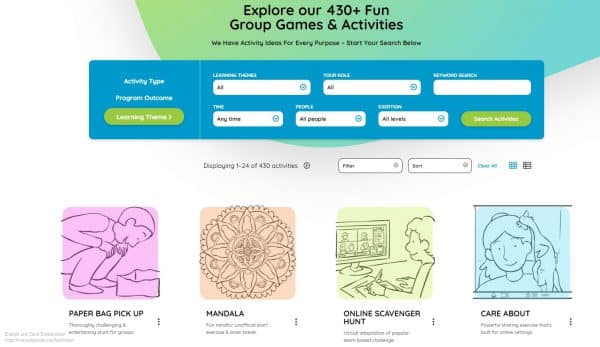
In the next few weeks we will be welcoming students back into our buildings. This will be a very exciting time and it will be important to help students feel at ease and games can be a great way to do that. If you are looking for fresh ideas for group activities and games, the Playmeo website is a great resource.
Many activities are free and you can search by learning theme, program outcome, or activity type. Additionally, you can sort by group size and how much time you have for the activity.
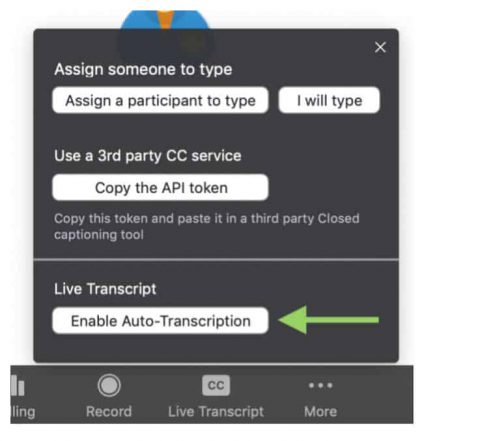
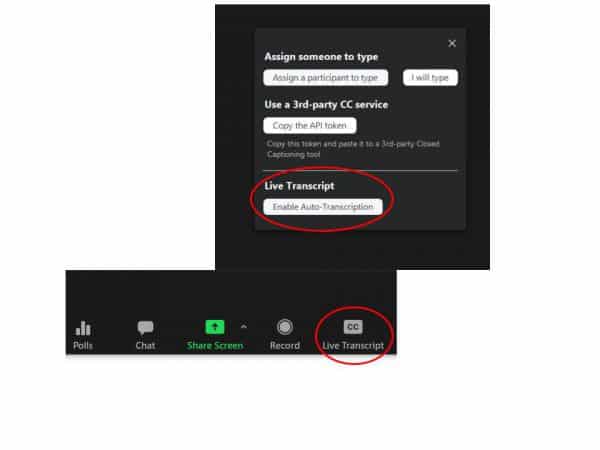
Closed captions are an essential accessibility tool for people who are deaf or hard of hearing (and for people with other conditions as well). Captioning is also a useful feature for many students as an additional representation of information in a virtual setting. Previously in Zoom, closed captioning was only available from third party providers or by assigning someone to type captions. Now automatic, live transcription of closed captions is an available feature in the Zoom desktop client (not the Chrome browser application). Once enabled, this automatically adds text to the bottom of the video with what the host and others are saying. Please note however, live transcription does not work in breakout rooms, only within the main session.
The option to turn on Closed Captioning is in the Zoom toolbar (it may be under “More” depending on window size).
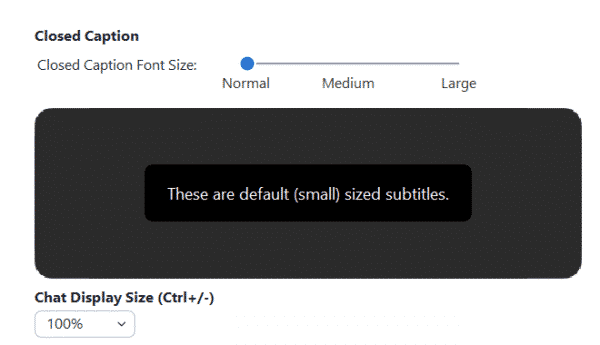
When closed captioning is enabled, as the host you will see the live-transcript below your video, but they DO NOTautomatically appear for your participants. Instead, participants will receive a notification and must click the “Closed Caption” option in the menu bar (and usually click Show Subtitle) to start viewing the captions. Once they have done so, the size of the captions can be adjusted under “Accessibility” in the video settings.
Adjust font size in “Video Settings,” under “Accessibility.”
Elaborating on the CC options:
Show Subtitles – Displays captioning on the bottom of the video. You can also select Hide Subtitle once subtitles are selected to hide them.
View Full Transcript – Opens a panel/pop-up and displays captions in real-time with both the speaker’s name and time stamp. In that pop-up, participants will also see a button to save the transcript (this button might not be available if the host has disabled this functionality). If enabled, click Save Transcript. A copy of the transcript as a .txt file will be downloaded to your machine. Note: Transcripts save up to the moment when you click Save Transcript. If you click Save Transcript multiple times throughout the event, it will overwrite/update the existing file. We recommend clicking Save Transcript just before the meeting ends to ensure you have the transcript from the entire meeting. There is no option to auto-save these transcripts.
Bear in mind:
Speak slowly, it will help the system capture the words you are saying
If there are any loud disruptions (i.e. cars outside or school bells) pause and hold your thoughts until the noise passes.
If you are hosting a meeting with live-transcription, we recommend making a comment at the beginning of your meeting informing your meeting participants that live-transcription is available and a note about how to enable them. Encourage all your students to try turning the captions on to see if it has an impact on their comprehension or capacity to pay attention. Make it a best UDL (Universal Design for Learning) practice to enable closed captioning during all of your meetings.
For more information on UDL and closed captioning, please read this article.
With the start of the 2nd semester arriving soon, we’d like to again provide step by step directions (please see below) for those teachers interested in transferring content from one Canvas course to another. We shared similar directions covering the export/import process at the outset of our school year to assist teachers in migrating content out of courses they had created and built in to the MISTAR-rostered course shells that appeared in their accounts.
Google Assignments: Create new or edit existing Google Assignment Assignments within Canvas to use the Google Assignments External Tool option, not Google Cloud Docs (to update them to the new integration since the old integration will be deprecated this summer). When the course export is used, Google Assignments also transfer to the new course.
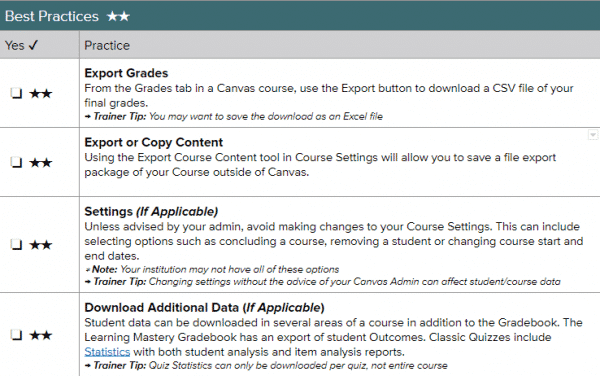
*Please note that canvas exports do not include backups of student interactions and grades. Grades can be exported separately as CSV files.
**Year-long courses do not apply here. However, it is still good practice to make backups of your courses.
Below are some best practices when transferring content, this includes exporting your grades, settings, and downloading additional data.
Best Practice: Keep Sem 1 and Sem 2 clean and separate to have easier content management and processing. For those with a course that spans the year, consider just copying the last module or most recent content from your Semester 1 course into your Semester 2 course so that you are starting with an almost fresh course. (You can always have view access extended to the Semester 1 course so that students are able to review their past work at any time – unless you’d prefer to restrict access to that course content.)
You could also extend course dates in Semester 1 courses if you need students to have more time to participate/work in those courses, although you will need to bear in mind MISTAR grade submission deadlines.
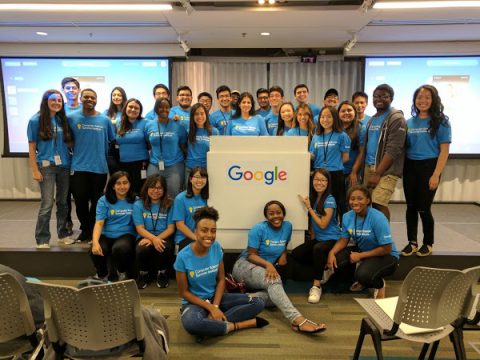
Google offers a number of Computer Science Summer Institute (CSSI) opportunities for graduating high school seniors in Summer 2020! Details on two are pasted below this general information. High school seniors are encouraged to apply by Friday, February 28th at 11:59 pm. The Detroit session will take place July 7th – July 27th at the Google Detroit office. They have other Institutes in other states for which they cover airfare, room and board.
CSSI aims to provide students with an interest in computer science an opportunity to learn what their future careers may hold and inspire them to complete their work toward a technical degree. The Institute encourages students to develop their technical skills, while also building important personal networks and friendships with a diverse group of students who share their passion!
Students can expect:
a specially-designed, project-based curriculum to help prepare for their CS studies
daily development sessions to help them prepare for future job opportunities
interaction directly with Google Engineers
exposure and insight into Google’s internship programs and technical career opportunities
To apply, students will need to do the following:
Complete the general application, found on their website. This will include a high school transcript and answers to two
essay questions.
Participate in Google’s Online Challenge after the general application closes. Students
will receive further instructions after the general application closes.
Computer Science Summer Institute (CSSI) for Historically Black Colleges and Universities’ (HBCUs) mission is to promote equitable representation in tech by connecting incoming HBCU students with like-minded peers, Google engineers, CS professors, HBCU alum in CS, and Black technologists in the local tech ecosystem.
Our goal is to increase the retention rate of students from Historically Black Colleges and Universities graduating with computer science degrees. At CSSI-HBCU, students cultivate an unparalleled community to support them in their journey to and through university, internships, and full-time opportunities at Google and in tech.
During the program, cohorts of students from geographically-similar HBCUs participate in a three-week dorm program based in Raleigh, NC or Huntsville, AL, where they’ll be taught an introduction to computer science by Google engineers. Through an engaging and hands-on curriculum, students develop a solid foundation of computational thinking, which prepares them for their future studies in CS. The program finishes with a capstone project where students develop an application, so they have the tangible proof of what they’re able to achieve.
Program includes:
A specially designed, project-based Python curriculum to best prepare students for their first year of college in CS
Daily developmental sessions to help prepare students for CS studies and future job opportunities
Robust opportunities to learn and interact with Google engineers
10:1 student-to-teach ratio to provide a personal learning experience
Exposure and insight into Google’s internship programs and technical career opportunities
Eligibility and application
Students must:
Be a current high school senior
Considering an HBCU as one of their top two college or university choices
Intend to be enrolled as a full-time student in a 4-year BA/BS program in the US (excluding territories) or Canada in Fall 2020
Intend to be enrolled at an HBCU in a computer science, computer engineering, software engineering, or a related department for the 2020-2021 academic year
Be able to demonstrate an interest in studying computer science
Be able to attend every day of CSSI
The program is open to all qualified high school seniors who meet the above criteria.
We especially encourage applications from students underrepresented in the engineering and tech industry, including Women, Black, Latinx, Hispanic, Native American, Veterans, and students with disabilities.
Application materials
Please complete the online application, which will include:
The general application
A current unofficial or official high school transcript (PDF required)
Responses to multiple short answer questions. Each response should be under 200 words (PDF required)
Participate in Google’s Online Challenge after the general application closes. You will receive further instructions after the application closes.
If any items are missing from your application, you will not be considered for the program
Program locations and dates
2020 Program locations:
Alabama A&M University: July 5, 2020 – July 25, 2020
North Carolina Central University: July 12, 2020 – August 1, 2020
FAQ
What’s the design of the program? CSSI-HBCU is a three-week dorm program taking place in Huntsville, AL and Durham, NC.
What level of computer science experience is required? As long as you demonstrate an interest and enthusiasm for computer science, no technical background is necessary. We accept and encourage applications from students of all technical levels for CSSI as long as you meet all other eligibility requirements.
How do I apply? Please select the “apply” button on this page. Applications will only be considered if all materials are included. For tips on technical resume writing, please visit our Virtual Career Fair or our “Applying to Google” article.
What if I am taking a gap year? Am I still eligible for the program? Students who are currently on a gap year and will be attending college in Fall 2020 are eligible to apply to the program. If you are going to take a gap year for the 2020-2021 school year, please wait to apply the following year.
What if I’m enrolling in a two-year college or community college in the Fall of 2020? If you plan to enroll in a four-year college after your two-year or community college career, you are eligible for SCCI-HBCU. Please note that students who will only be studying for their associates degree are not eligible at this time.
When will I be notified if I’m accepted? Applicants who are accepted will be notified in mid-May.
What costs does Google cover? Google will cover the cost of the students’ round-trip flight within the US and Canada. Google will also be providing on-site housing and food for students who are selected to attend the program.
What are the dates of the program? We are currently working on our 2020 dates and will post them as soon as we can!
Where will the students be staying? The students will be staying in dorm style housing in Huntsville, AL or Durham, NC. Details on housing, logistics, and daily transportation to Google’s offices will be shared with accepted attendees.
Why have we selected these two locations? The program will take place in Huntsville, AL and Durham, NC. We’ve selected these two locations as they’re near HBCUs we partner with. These cities are also close to Google offices and local partners which ensures we’re able to include more Google volunteers in the program.
Can I choose my roommate for the program? If you know another attendee and wish to share a room with them, we can try to accommodate your request. However, we hope students will network, make new friends, and room with someone they haven’t met yet.
What if I have a conflict that requires me to miss part of CSSI? All students selected for CSSI must be able to attend every day of the program. We are unable to make any exceptions. Please make every effort to be available each day (for example, working with your university to attend an orientation session that fits with your schedule). If a schedule conflict arises, notify the CSSI team immediately, so they’ll be able to find another student to attend the program in your place.
Who are the HBCUs selected to participate in CSSI-HBCU? All HBCUs are invited to participate in CSS-HBCU. Our aim is to create a consistent, strong pathway from HBCUs to internship and full-time opportunities at Google.
Do I need to send an official copy of my transcripts and SAT/ACT scores? Unofficial or official transcripts will be accepted. You do not need an SAT or ACT report — just type in your score in the application. If you will be attending a university that does not require SAT or ACT scores and did not take either of these exams, simply leave this section of the application blank.
I will not be a first-year university student in Fall 2020, may I still apply? No. CSSI is only open to qualified high school seniors entering their first year of university study in Fall 2020. Younger students may visit our Google in Education site to explore our K-12 opportunities. Current university students may visit our technical opportunities pages for full-time and internship opportunities.
Are international students eligible? International students are eligible to apply as long as they intend to be enrolled at an HBCU in the US or Canada in Fall 2020. Please note that if selected, Google will only provide round-trip airfare within the US and Canada or cover a portion of your flight.
Is there an age requirement for CSSI? No, there is currently not an age requirement to attend CSSI. Please note if you are under the age of 18 at the time of application, a parent or guardian will need to sign all forms on your behalf.
I got into CSSI, does this mean I received a scholarship as well? If I don’t get into CSSI, do I still have a chance to receive the scholarship? Acceptance into CSSI does not automatically grant you a scholarship. You must apply separately to the Generation Google scholarship to be considered. Please see our Scholarship+ page for more information about our scholarship offerings.
I live in a U.S. territory/I will be attending school in a US territory, am I eligible? If you will be attending school in a US territory in Fall 2020, you will not be eligible to apply. However, if you live in a US territory but plan to attend school in one of the 50 states, you can apply as long as you meet all other requirements. Note that Google will only provide round-trip airfare within the US (excluding territories) and Canada.
What if I want to withdraw my application? We are sorry you want to withdraw your application for CSSI. Please send a note to cssi-hbcu@google.com and your application will be deleted from our system, along with your opted-in information, within two days (48 hours) of receipt of your note.
What is Google’s Online Challenge?? Google’s Online Challenge is a 30-minute online challenge that will ask about your general cognitive ability to problem solve questions. You will receive an email after the general application closes giving you the time and date the challenge will open. You must complete the challenge in one sitting. Think of this as a way to demonstrate your amazing problem solving skills!
If you have questions that aren’t answered in our FAQ, please email cssi-hbcu@google.com. We’re happy to address any questions directly related to the CSSI Program, but are unable to respond to other inquiries. We will not respond to spam, barraging messages, or messages that are primarily inflammatory or exploitative in nature.
CSSI at Google overview
Computer Science Summer Institute (CSSI)’s mission is to provide a space for young, aspiring computer scientists to succeed by connecting incoming freshmen with like-minded peers and Google engineers in this three-week program. At CSSI, students will learn programming fundamentals directly from Google engineers, get an inside look at some of Google’s most exciting technologies, and even design and develop their very own application with fellow participants that will be showcased to Googlers. Students attend the program at one of our Google offices and experience firsthand Google’s unique and innovative office culture.
Program includes:
A specially designed project-based curriculum that includes HTML/CSS, JavaScript, Python and Google App Engine to help prepare students for their first year of college CS
Daily developmental sessions to help you prepare for your CS studies and future job opportunities
Opportunities to interact directly with Google engineers
10:1 student-to-teacher ratio to provide a personal learning experience
Commuter students will receive a travel stipend (this will usually cover all or almost all of your travel expenses) and will be provided lunch. Dorm students will have their housing, transportation, and meals covered for the duration of the program
Two weekend activities planned at no extra cost
Exposure and insight into Google’s internship programs and technical career opportunities
Eligibility and application
Students must:
Be a current high school senior
Intend to be enrolled as a full-time student in a 4-year BA/BS program in the US (excluding territories) or Canada in Fall 2020
Intend to be enrolled at a university in a computer science, computer engineering, software engineering or related area department for the 2020-2021 academic year
Be able to demonstrate an interest in and motivation for studying computer science.
Be able to attend every day of CSSI
The program is open to qualified high school seniors who meet the above criteria.
We especially encourage applications from students underrepresented in the engineering and tech industry, including Women, Black, Latinx, Hispanic, Native American, Veterans, and students with disabilities.
Application materials
Please complete the online application, which will include:
The general application
A current unofficial or official high school transcript (PDF required)
Responses to multiple short answer questions. Each response should be under 200 words (PDF required)
Participate in Google’s Online Challenge after the general application closes. You will receive further instructions after the application closes.
If any items are missing from your application, you will not be considered for the program
Program locations and dates
We have two different types of programs. If you live near one of our Commuter offices, you will travel into the Google office each day. If you don’t live near a participating Google office, you will be considered for our Dorm program, where you will stay in dorms on site for the duration of the program. Our 2020 program locations and dates are still being determined, please check back soon.
Atlanta, GA: July 7th – July 27th
Cambridge, MA: July 13th – July 31st
Chicago, IL – July 8th – July 24th
Detroit, MI – July 7th – July 27th
Washington D.C. – July 7th – July 27th
Los Angeles, CA: July 13th – July 31st
Mountain View, CA: July 13th – July 31st
New York City, NY: July 7th – July 27th
Pittsburgh, PA: July 13th – July 31st
Seattle, WA July 13th – July 31st
Waterloo, ON July 6th – July 24th
Please note: students will only be considered for one site (either dorm or commuter) based on their home location and cannot request to attend another site. We will confirm which site you are being considered for shortly after the application deadline.
FAQs
How do I apply? As soon as we begin accepting applications, please select the “apply” button on this page. Keep your eyes peeled in January, and remember to review the list of required application materials. Applications will only be considered if all materials are included. For tips on technical resume writing, please visit our Virtual Career Fair or our “Applying to Google” article.
Do I need to send an official copy of my transcripts and SAT/ACT scores? Unofficial or official transcripts will be accepted. You do not need to have your current year grades on the transcript, but it must include prior years of high school. We do not require SAT or ACT scores on the application.
Who is eligible to apply? The program is open to all qualified high school seniors who are entering their first year of university study in Fall 2020. We are committed to addressing diversity in the technology industry. Students who are a member of a group that is historically underrepresented in the technology industry are encouraged to apply.
I will not be a first-year university student in Fall 2020, may I still apply? No. CSSI is only open to qualified high school seniors entering their first year of university study in Fall 2020. Younger students may visit our Google for Education site to explore our K-12 opportunities. Current university students may visit our technical opportunities pages for full-time and internship opportunities.
What if I am taking a gap year? Am I still eligible for the program? Students who are currently on a gap year and will be attending college in Fall 2020 are eligible to apply to the program. If you are going to take a gap year for the 2020-2021 school year, please wait to apply the following year.
What if I’m enrolling in a two-year college or community college in the Fall of 2020? Students who are not enrolling in a four-year university in Fall 2020 are not eligible to apply. If you plan to enroll in a four-year college after your two-year or community college career, please note you may be eligible for one or more of our Google scholarships.
Are international students eligible? International students are eligible to apply as long as they intend to be enrolled at a university in the US or Canada in Fall 2020. Please note that if selected for a residential site, Google will only provide round-trip airfare within the US and Canada.
Is there an age requirement for CSSI? No, there is currently not an age requirement to attend CSSI. Please note if you are under the age of 18, a parent or guardian will need to sign all forms on your behalf.
I got into CSSI, does this mean I received a scholarship as well? Acceptance into CSSI does not automatically grant you a scholarship. You must apply separately to the Generation Google scholarship to be considered. Please see our Scholarships+ page for more information about our scholarship offerings.
When will I be notified if I’m accepted? Applicants who are accepted will be notified in early-mid May.
What level of computer science experience is required? As long as you demonstrate an interest and enthusiasm for computer science, no technical background is necessary. We accept and encourage applications from students of all technical levels for CSSI as long as you meet all other eligibility requirements.
I live in a U.S. territory/I will be attending school in a US territory, am I eligible? If you will be attending school in a US territory in Fall 2020, you will not be eligible to apply. However, if you live in a US territory but plan to attend school in one of the 50 states, you can apply as long as you meet all other requirements. Note that Google will only provide round-trip airfare within the US (excluding territories) and Canada.
What will Google pay for? For the dorm programs, Google will provide round-trip transportation within the US and Canada, and housing (including room fees and taxes). Most meals will be provided either at the dorm or at Google. For the day camps, students will be provided with a travel stipend and expected to commute into the respective Google offices for each day of CSSI. Students at commuter sites will receive lunch at no cost each day.
What will the housing be like for the dorm program? Students will live in dorm-style housing during CSSI 2020. Details on housing, logistics, and daily transportation to Google’s offices will be shared with accepted attendees.
Can I choose my roommate for the dorm program? If you know another attendee and wish to share a room with them, we can try to accommodate your request, but it is not guaranteed. However, we hope students will network, make new friends and room with someone they haven’t met yet.
What will be provided at the Google offices? The Google office is where classroom instruction will take place. Students will be provided with food at the Google offices during their stay.
How much will the travel stipend be for the day camp? This information will be shared with the participants, but will be sufficient to cover your cost to get to and from Google for the duration of the program.
What if I have a conflict that requires me to miss part of CSSI? All students selected for CSSI must be able to attend every day of the program. We are unable to make any exceptions. Please make every effort to be available each day (for example, working with your university to attend an orientation session that fits with your schedule). If a schedule conflict arises, notify the CSSI team immediately, so they’ll be able to find another student to attend the program in your place.
What if I want to withdraw my application? We are sorry you want to withdraw your application for CSSI! Please send a note to cssi@google.com and your application will be deleted from our system, along with your opted-in information, within two days (48 hours) of receipt of your note.
What is Google’s Online Challenge?? Google’s Online Challenge is a 30-minute online challenge that will ask about your general cognitive ability to problem solve questions. You will receive an email after the general application closes giving you the time and date the challenge will open. You must complete the challenge in one sitting. Think of this as a way to demonstrate your amazing problem solving skills!
If you have questions that aren’t answered in our FAQ, please email cssi@google.com. We’re happy to address any questions directly related to the CSSI Program, but are unable to respond to other inquiries. We will not respond to spam, barraging messages, or messages that are primarily inflammatory or exploitative in nature.
The January newsletter’s focus is on Research & Study Skills using the RW4G WEB TOOLBAR and more! Don’t miss this month’s Teacher Feature! WriQ, a writing assessment tool from Texthelp (the same people that brought us Read&Write for Google). WriQ offers both free and premium features to help you improve student writing outcomes. Click on the link in the newsletter to learn more and check out the extension in the Chrome store!
Adobe Flash has been supporting online games, content, and interactive features since 1996. But due to the changing and evolving of newer technologies other mediums such as HTML5 which are more power-efficient and faster, Flash has become less and less popular. At one point 80% of the content on the internet was Flash-based. Since 2017, that number is down to 17%. Due to this, Adobe has determined an End of Life (EOL) date of December 31st, 2020 for the plugin.
What does this mean?
Many different learning websites including sites such as Starfall and CoolMathGames were entirely Flash-based. When the announcement by Adobe was made to end Flash (plugin player support/updates and distribution), many websites started to convert their content to HTML5 and other delivery mechanisms. However, it is up to websites to make this transition. So, as you are planning different learning activities for students, please ensure that you have vetted the website to see if it relies on Flash. A way to check to see if a site uses Flash, Right-clicking on any part of a website will make a box appear with options you can click on. If you see Zoom in at the top of the box and About Adobe Flash Player at the bottom of the box, then you know that you have Flash on the website.
If the site migrates to open web standards (such as HTML5), you shouldn’t notice much difference except that you’ll no longer see prompts to run Flash on that site. If the site continues to use Flash, and you give the site permission to run Flash, it will only work through the end of 2020.
For more information please check out these articles:
The Dearborn Public Schools Technology Department is excited to announce a professional development opportunity for teachers: the Saturdays with Moodle series! They will offer 5 classes all about Moodle and some of its more popular features. Attend as many classes as you desire, and leave with something you can use in your classroom the next week! All classes are at the Administrative Service Center, 18700 Audette in Dearborn, and run from 9:00 am-1:15 pm. Cost is $50 per class.



 You can always remove or edit your filter in Setting by clicking on the wrench icon in the upper-right corner.