Here are some tips shared recently.
ORGANIZE YOUR WAFFLE GOOGLE APPS by clicking and dragging the Google apps within it:
YOUTUBE PICTURE in PICTURE allows you to “float” — remember to right click TWICE:
Here are some tips shared recently.
ORGANIZE YOUR WAFFLE GOOGLE APPS by clicking and dragging the Google apps within it:
YOUTUBE PICTURE in PICTURE allows you to “float” — remember to right click TWICE:

Did you know Canvas has discussion boards? They are a powerful learning tool when we are remote or in-person. Using this medium encourages all students to participate, not just a few vocal students. Additionally, by writing comments as a “rehearsal” for a live discussion you may get more thoughtful contributions. Here are a few main points to note:
When you begin using discussion boards, you might find that students need help cultivating quality responses. Setting expectations from the beginning help reduce frustration.
Seesaw Connect for School & District Leaders is/was a FREE virtual conference. Immerse yourself in on-demand sessions with fellow district leaders, one-of-a-kind live events with the Seesaw team, and small group discussions to spark innovation and connection.
Seesaw Connect mini courses are hosted on the Community Learning Hub powered by Thinkific. Mini courses will be available from March 1st through March 31st, 2021.
Explore one idea in less than five minutes!
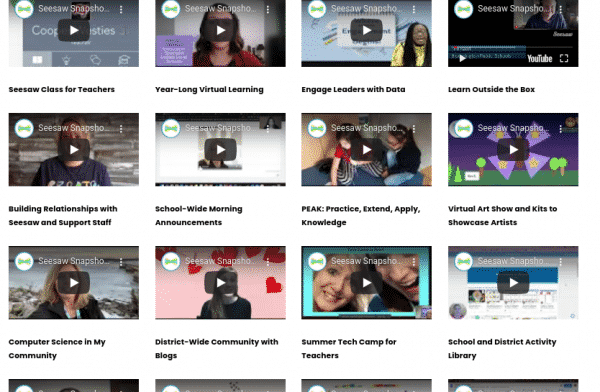
Seesaw Snapshots can be found curated on the conference page and are videos submitted by our global community of school and district leaders. Get a glimpse into projects, initiatives, strategies, and ideas that have been successful in other schools.

issue 37 highlights include:
Some of the offerings available through the Google Teacher Center, including tips on their various apps and the option to sign up for their 8-week email training series that delivers video tutorials to your inbox every Tuesday on core Google tools. Lessons take less than 10 minutes to complete (choose Education Fundamentals).
Designed as an entry point into the wealth of resources, Learn with Google Arts & Culture highlights subject related content including lesson plans, stories, videos, high resolution images, 3D models, and more from museums around the world. Check it out!
The latest installment of the Black History and Culture project celebrates U.S. Black artists, music makers, and pop culture icons. Plus, check out seven new downloadable lesson plans covering history, music, politics, and sports.
Discover Kandinsky’s life, art and synesthesia with the Centre Pompidou. You can ‘listen’ to one of his paintings or project his works into your home in AR. A lesson plan can be used in class or given to students to work through.
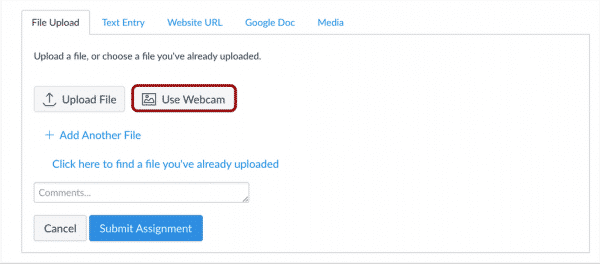
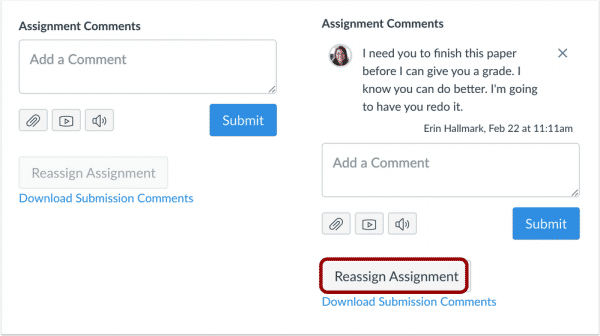
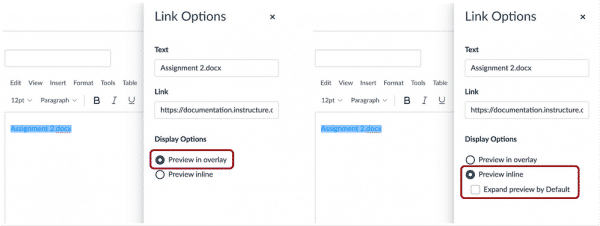
Canvas has annual updates which include items such as new features, “bug” fixes, and enhancements to make the Canvas experience more efficient. On March 20th, Canvas will be releasing a fairly significant update that will benefit all users. Below is a list of notable features:


March is Women’s History Month. Here is a choice board that can be used by students to help students explore influential women and create something using their new knowledge. You can explore it yourself to find things that relate more specifically to your content. These are geared toward upper grade levels.
To find more lesson plans based for all grade levels try these resource collections:
March is Reading Month. To celebrate, use this “activity board” for students to explore books and create their own literary works. Be sure to preview the links yourself and File/Make a Copy if you want to make modifications. You’ll need to review the “Create a Reading Fort” link to insert your own place where students can share what they create, perhaps they could post a picture to the Canvas discussion board. You can also share this particular resource with the short link: bit.ly/readacross21 Happy Reading Month!
For all staff who use MISTAR-Q you will soon see a new login screen with an updated styling and logo. NOTE: A user’s credentials WILL NOT CHANGE with the new login screen.
New login screen with District Announcement sample.

Once a user logs in, there are more selections if more than one track is available to the staff:

The user can select the radio button of Current Year tracks or All tracks. This is a very helpful feature for those staff, like secretaries and counselors, who have tracks open in both the current and next year.
Whether you’re new to the IXL program or a seasoned veteran, their complimentary webinars will help you get the most out of IXL. Join any of these free 30 minute sessions hosted by their Professional Learning team to take your IXL usage to the next level.
A few webinar topics are listed below.
To attend one or more of their free 30-minute sessions, teachers and administrators can sign up here.
John Sowash’s monthly EDU newsletter always lists ten or more links he briefly describes and commends for educators to check out. Some recent ones he’s called out are:
On February 17th Google announced several updates for Google Workspace for Education. John’s newsletter has organized some of them into infographics shown below.
FOR CHROMEBOOKS….
The screen recording updates are very exciting, encouraging students to press record for formative and summative assessments which can be very powerful and now more easily done on a Chromebook! Stay tuned to see if this will also allow students to record their screen via Canvas Studio.

FOR GOOGLE DRIVE….
There are also several updates apparently coming soon to Google Drive. The two that will most likely impact students and teachers are Form draft responses and revision history in Jamboard. In Google Forms, students will be able to stop and return to a form at a later date and time. Please note this is set to launch, “later in 2021” so do not plan to utilize this functionality just yet. One of the biggest frustrations with Jamboard has been the fact that frames can be easily removed and those changes are very difficult to track. Soon, it will be much easier to track changes and revert to previous versions in Jamboard.