
We are sending out this important notice regarding a recent fix to the configuration of staff Smartboards across the district.
What is Changing?
We have corrected an error that prevented Smartboards from performing their required nightly reset and logout.
Effective Monday December 8, your Smartboard will perform a nightly reset and logout procedure.
What This Means for You
- You will be logged out daily: When you arrive in the morning, the board will not be logged into your profile.
-
Daily Login Required: You will need to log in to the Smartboard each day to access your files, settings, and district resources.
What Your Board Should Look Like in the Morning
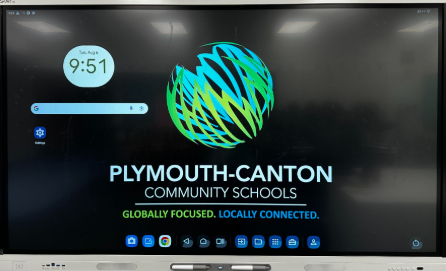
When you turn on your board in the morning, you should see the standard black screen with the PCCS logo.
-
There should be no whiteboard files visible on the screen.
-
The board should not show you as logged in.
⚠️ Critical Note on Saving Your Work
This mandatory daily reset process means that nothing you do on the Smartboard will be saved permanently unless you are logged into your individual profile.
-
To ensure your work, files, and settings are preserved, please make sure you log in when you start using the Smartboard each day.
Need Help?
If your board remains logged in, or you do not see the black screen with the PCCS logo when you arrive in the morning, please submit a tech request immediately so the issue can be addressed.
-
For assistance with the daily login process, please view these directions. If you have never logged in to your board – please use these initial set up directions.
Thank you for your understanding as we implement this necessary security and system stability update.